


In today’s competitive digital landscape, application stability is no longer a luxury but a necessity. Users expect seamless performance across devices and platforms, and even a minor crash can lead to negative reviews, revenue loss, and damaged brand reputation. This is where app crash reporting software plays a vital role. By detecting, analyzing, and helping resolve crashes in real time, these tools empower development teams to maintain high standards of reliability and user satisfaction.
TLDR: App crash reporting software helps developers detect and fix stability issues quickly by collecting detailed crash data in real time. It improves user experience, reduces downtime, and strengthens brand reputation. With actionable insights, automated alerts, and performance tracking, teams can resolve issues before they escalate. Investing in crash reporting tools is essential for maintaining a stable and competitive application.
What Is App Crash Reporting Software?
App crash reporting software is a monitoring tool designed to automatically detect, log, and report application crashes. When an app fails, the tool captures critical technical data such as stack traces, device information, operating system details, and user actions leading up to the crash. These insights help developers diagnose the root cause quickly and efficiently.
Unlike manual bug reporting, which relies on user descriptions, crash reporting tools provide structured and precise diagnostic information. This eliminates guesswork and significantly reduces debugging time.

Why App Stability Matters
Application crashes can have serious consequences, including:
- User frustration and declining trust
- Lower app store ratings and negative reviews
- Revenue loss due to churn and abandoned transactions
- Increased support costs from complaint handling
Research consistently shows that users are quick to abandon apps that crash more than once or twice. In crowded marketplaces, switching to a competitor is effortless. Therefore, maintaining performance stability is one of the most critical success factors for any app.
Core Features of Crash Reporting Tools
Modern crash reporting platforms offer a variety of powerful capabilities to ensure comprehensive monitoring and rapid issue resolution.
1. Real-Time Crash Detection
Real-time reporting ensures that crashes are logged immediately after they occur. Development teams receive instant alerts, enabling them to begin troubleshooting without delay.
2. Detailed Diagnostic Reports
Effective tools collect:
- Stack traces
- Device model and OS version
- App version
- Memory usage data
- User actions prior to crash
This detailed data accelerates root cause analysis and minimizes time spent reproducing errors.
3. Issue Grouping and Prioritization
Advanced systems automatically group similar crashes together, preventing duplicate tickets and helping teams focus on high-impact issues. Developers can prioritize fixes based on frequency, severity, or user impact.
4. User Impact Analysis
Understanding how many users are affected by a particular crash helps teams determine urgency. Some tools also indicate whether crashes affect paying users, specific regions, or certain devices.
5. Integration with Development Workflows
Integration with project management and DevOps tools streamlines collaboration. Crash reports can automatically generate tickets, notify relevant engineers, and sync with release cycles.

Benefits of Using App Crash Reporting Software
Implementing crash reporting solutions offers tangible operational and business advantages.
Improved User Experience
By identifying and resolving stability issues quickly, companies provide smoother experiences. A stable app increases retention and fosters positive reviews.
Faster Debugging
With comprehensive crash logs, developers spend less time trying to replicate issues manually. Faster resolution reduces downtime and protects revenue streams.
Data-Driven Decision Making
Crash analytics reveal patterns and trends. For example, teams may discover that certain devices or OS versions contribute disproportionately to instability, guiding future optimization efforts.
Enhanced Brand Reputation
A reliable application reflects professionalism and attention to quality. Businesses that proactively address crashes build long-term customer trust.
How Crash Reporting Software Works
Most crash reporting systems function through embedded software development kits (SDKs) integrated into the application. These SDKs silently monitor performance during runtime.
When a crash occurs:
- The SDK captures diagnostic data.
- The data is securely transmitted to a cloud-based server.
- The platform analyzes and categorizes the crash.
- Developers receive alerts and access visual dashboards.
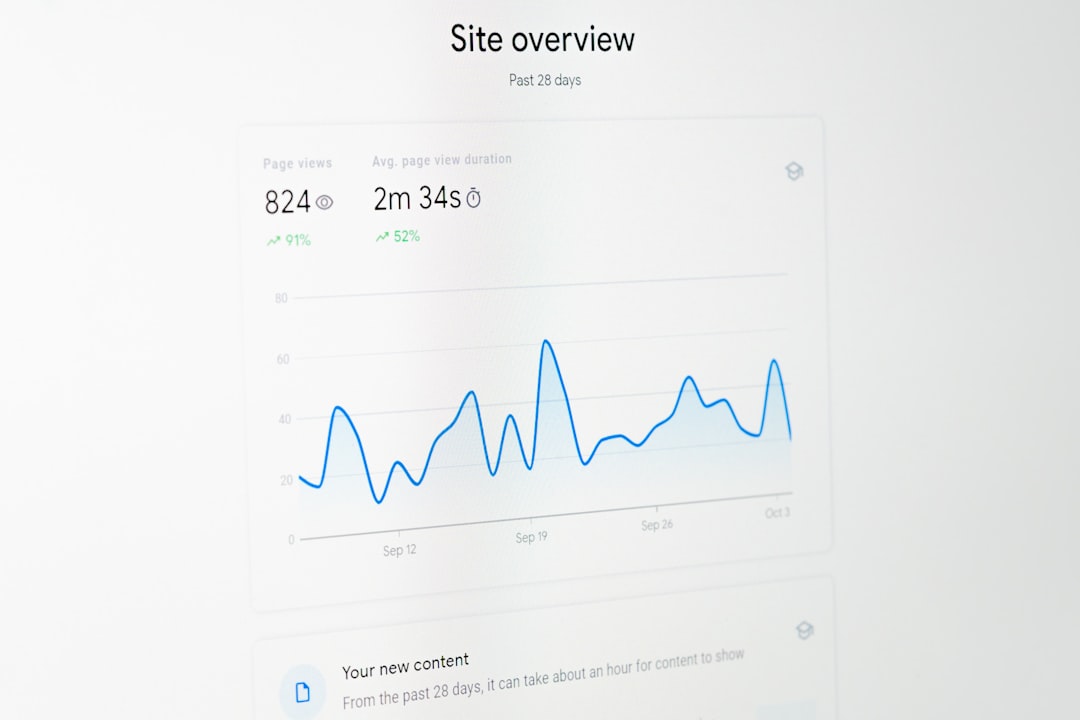
Dashboards typically display metrics such as crash-free users, crash-free sessions, error frequency, and trends over time, making it easier to measure improvement.
Best Practices for Maximizing Effectiveness
Simply installing a crash reporting tool is not enough. Teams must use it strategically to maximize benefits.
Monitor Crash-Free Metrics
Tracking percentages of crash-free sessions provides a clear stability benchmark. Setting measurable goals, such as maintaining 99.9% crash-free sessions, keeps teams accountable.
Prioritize High-Impact Issues
Not all crashes are equal. Teams should focus first on issues:
- Affecting the largest number of users
- Impacting monetization flows
- Occurring during onboarding or login
Release Updates Iteratively
Frequent updates help implement fixes quickly while minimizing new risks. Combining crash reporting insights with controlled rollouts reduces unintended side effects.
Combine with Performance Monitoring
Crash reporting works best alongside performance monitoring tools that track latency, load times, and network requests. Together, they provide a comprehensive picture of app health.
Mobile vs. Web Applications
Crash reporting requirements differ slightly between mobile and web environments.
Mobile Apps:
- Handle device fragmentation
- Track OS-specific crashes
- Monitor memory and battery constraints
Web Applications:
- Analyze browser compatibility issues
- Track JavaScript errors
- Monitor server-client interactions
Both environments benefit from automated monitoring but require tailored configurations for maximum effectiveness.
Security and Privacy Considerations
Since crash reporting tools collect technical data, privacy protection is essential. Reputable platforms provide:
- Data encryption in transit and at rest
- User data anonymization
- Compliance with regulations like GDPR and CCPA
Organizations should always review data handling policies and configure tools to avoid collecting personally identifiable information unless absolutely necessary.
Choosing the Right Crash Reporting Solution
When selecting a crash reporting tool, key evaluation criteria include:
- Platform compatibility (iOS, Android, Web, cross-platform frameworks)
- Ease of integration and documentation quality
- Scalability for growing user bases
- Custom alerting capabilities
- Comprehensive analytics dashboards
Organizations should also assess customer support responsiveness and pricing structures to ensure long-term viability.
The Future of Crash Reporting
As applications grow more complex, crash reporting software continues to evolve. Innovations include AI-driven root cause suggestions, predictive analytics, and automated remediation workflows. These advancements reduce manual intervention and further accelerate troubleshooting.
Machine learning algorithms can now identify patterns across millions of data points, highlighting underlying architectural weaknesses before they lead to widespread failure. This proactive approach represents the next stage in application stability management.
Conclusion
App crash reporting software is a cornerstone of modern application development. By providing real-time insights, structured diagnostic data, and actionable analytics, these tools help teams maintain high stability standards. In an era where user expectations are unforgiving, proactive monitoring is essential to protect both revenue and reputation. Organizations that prioritize crash reporting not only resolve issues faster but also build stronger, more reliable digital experiences.
FAQ
-
What is the main purpose of app crash reporting software?
Its primary purpose is to automatically detect, log, and report application crashes so developers can quickly identify and fix stability issues. -
How does crash reporting improve user retention?
By resolving crashes promptly, apps provide smoother experiences, reducing frustration and increasing the likelihood that users will continue using the application. -
Is crash reporting software suitable for small development teams?
Yes, even small teams benefit from structured crash data and automated alerts, which save time and reduce manual debugging efforts. -
Does crash reporting software affect app performance?
Most modern tools are optimized for minimal performance impact, capturing crash data efficiently without slowing down the application. -
What metrics should teams monitor regularly?
Teams should track crash-free sessions, crash frequency, affected user count, and trends across app versions to evaluate stability improvements.


How to Remove Sound From an iPhone Video: iMovie vs. CapCut
For a simple mute, iMovie is usually the safer choice on an iPhone; for social edits with music, captions, and…